



Table of Contents
Introduction
When you are working in RxJS, one of the most difficult tasks in asynchronous programming is dealing with error handling. The easiest way to trap errors in RxJS is to add an error call back in the subscribe call.
Error Handling With forkJoin
forkJoin is an operator that is best for use. If you are having issues in handling multiple requests on page load or want to move to action when all the responses are received. You can easily group the observables and emit the final value for each error.
The forkJoin is one of the RxJS operators to import { forkJoin } from ‘rxjs’. It allows us to take multiple Observables and execute them in parallel. It executes each Observable once completed or waits until the last input observable completes a value. The forkJoin will emit the all resolved Observable like single Observable value containing list.
The RxJS is a reactive JavaScript extension, it has a handful of an operator with different categories.
<!-- open a modal window by clicking button--> <button type="button" class="btn btn-info btn-lg" data-toggle="modal" data-target="#bootstrapModel">click to open</button> <!-- Modal section --> <div id="bootstrapModel" class="modal fade" role="dialog"> <div class="modal-dialog"> <!-- Modal content--> <div class="modal-content"> <div class="modal-header"> <button type="button" class="close" data-dismiss="modal">×</button> <h4 class="modal-title">Modal Header section</h4> </div> <!-- model body section --> <div class="modal-body"> <p>body text in the modal.</p> </div> <div class="modal-footer"> <button type="button" class="btn btn-default" data-dismiss="modal">Close</button> </div> </div> </div> </div>
forkJoinOperator() {
const obser1$ = this.http.get('https://jsonplaceholder.typicode.com/todos/1').pipe(
catchError(error => of(error))
);
const obser2$ = this.http.get('https://jsonplaceholder.typicode.com/todos').pipe(
catchError(error => of(error))
);
const obser3$ = this.http.get('https://jsonplaceholder.typicode.com/todos/f').pipe(
catchError(error => of(error))
);
forkJoin([obser1$, obser2$, obser3$]).subscribe(
(res) => console.log(res),
(error) => console.log(error)
);
}
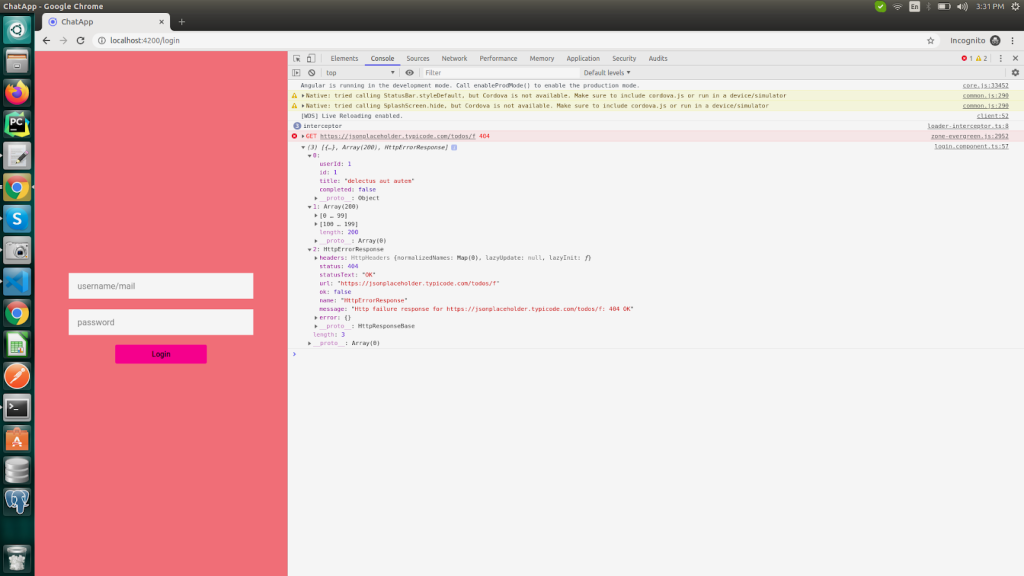
Like this way, once error$ throws an error, it’ll be handled internally and a new value will be returned to the other observable. You can map the error into any other value as shown in the inner object data.
Now, if you check the console, it’ll show an array containing two observe the objects and a string, with an error object that will print the error state.
Author: Prasanna R